
Go to Windows platform Display platforms icon
Go to Windows platform Go to Mac platform Go to Android platform Go to iOS platform
FotoSketcher icon

FotoSketcher

4.40
5 3 reviews
149.5 k downloads
security security

Transform your photos into works of art

Advertisement
Remove ads and more with Turbo
Advertisement
Remove ads and more with Turbo
Merche Contreras icon
Reviewed by
Merche Contreras
Content Editor
Merche Contreras is part of Uptodown's in-house Editorial Team. Translated by Uptodown Localization Team

FotoSketcher is a free and unique tool that turns your digital photos into stunning works of art using advanced image processing algorithms. With a focus on creativity and simplicity, this tool allows photographers, designers and enthusiasts to explore their artistic side without the need for technical expertise. FotoSketcher is ideal for personal and professional use, transforming everyday images into exhibition-worthy pieces.

Artistic transformations are now within everyone's reach

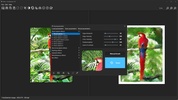
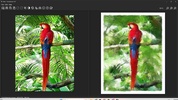
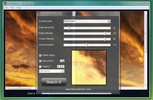
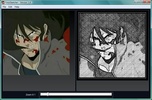
FotoSketcher's main feature is its ability to transform digital images into a wide range of artistic styles. From pencil drawings and watercolors to oil paintings and charcoal sketches, the app offers over twenty predefined styles that can be applied with just a few clicks. Each style has been meticulously designed to mimic traditional artistic techniques, ensuring results that resemble hand-drawn works. What's more, the tool allows you to customize each style by adjusting parameters like the intensity, texture, brightness and contrast, giving you complete control over the final result. This makes FotoSketcher a versatile choice if you are looking for a unique and professional finish.

Advertisement
Remove ads and more with Turbo

Intuitive interface and focus on simplicity

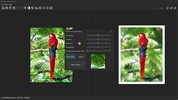
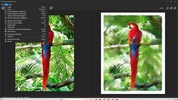
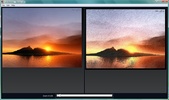
One of FotoSketcher's strengths is its accessible and easy-to-use interface. Designed for users of all levels, the app organizes its tools in a clear and logical fashion, allowing beginners to start creating immediately and advanced users to explore more detailed configurations. The main screen includes a split view that displays the original image alongside the processed result in real time, making on-the-fly adjustments easier and ensuring that every detail is perfected before the final job is saved.

FotoSketcher is more than an editing tool, it is a gateway to unlimited creativity. With its ability to transform digital images into true works of art, its user-friendly interface and its focus on quality, this app is a must-have for those who want to explore new artistic dimensions in their photos. Download FotoSketcher for free and enjoy all its great features.

Information about FotoSketcher 4.40

Basic information

Developer David Thoiron
Category Effects
Rating +7
Languages English
1 more

Distribution model

Pricing Free
License Proprietary
Copyright © 2026 David Thoiron
Why is this app published on Uptodown? (More information)

Security and privacy

Required permissions Not applicable
See security and antivirus report

Download info

Downloads 149,495
Date Jul 9, 2026
File type EXE
Size 34.94 MB
SHA256 9e166f13573ca3630c32dc546b8e5d3aa7253eb5d283d9d192b17359cf1c7e7f
Advertisement
Remove ads and more with Turbo

Older versions

See more
exe 4.30 Jun 17, 2026
exe 4.20 May 28, 2026
exe 4.10 Apr 15, 2026
exe 4.0 Mar 25, 2026
exe 3.98 Apr 2, 2025
exe 3.97 Dec 16, 2024
Available for other platforms

Rate this App

Review the app
FotoSketcher icon

Rating

5.0
5
4
3
2
1
3 reviews

Comments

helinux icon
helinux
in 2021

Amazing!!!! Thank you!!!!

22
Reply
jdav icon
jdav
in 2010

It's good =d has many editing options

1
Reply
Lokillone icon
Lokillone
in 2010

This is spectacular; my photos and images look hand-painted, hahaha.

Like
Reply
Advertisement
Remove ads and more with Turbo
Wink icon
Edit photos and video with the help of AI
Gimp Paint Studio icon
Apply stunning effects to your photos using GIMP
Microsoft Photo Story icon
Create video presentations with your own photos
My Fantasy Maker icon
The easiest way to swap one face for another in a photo
3D Miracle icon
Generate single image stereograms from a 3D object
GMIC icon
Edit your photos and apply amazing effects
CyberLink PhotoDirector icon
Give your photographs a professional touch
BeautyCam icon
Live streaming from BeautyCam's iOS and Android app
Picasa icon
Organize and view all your pictures easily
DaVinci Resolve icon
The most powerful and complete post-production video tool for PC
Adobe Photoshop icon
Professional photo editing from Adobe
Adobe Photoshop Lightroom icon
Edit your digital pictures with this elegant tool
ibis Paint icon
Unleash your imagination in this drawing app
Canva icon
Create incredible posts for social networks
Adobe Illustrator icon
Create logos, illustrations, and designs with this powerful editor
AutoCAD icon
Create, edit, and automate 2D and 3D designs professionally